
Google BigQuery
What Is Google BigQuery?
Google BigQuery is a fully-managed, server-less data warehouse that enables scalable and fast SQL queries using the processing power of Google's infrastructure. It is designed to handle large datasets, allowing users to analyze terabytes of data in seconds and petabytes in minutes.
MetaRouter provides an efficient Extract, Transform and Load (ETL) platform that streams structured customer data into BigQuery in real-time. Ensure that data is always structured properly with MetaRouter's parameter-by-parameter data mapping and transformation playbooks.
Product Type: Data Warehouse
Integration Type: Starter Kit
Event Source Type: Web, Mobile Browser, and Mobile App
Event Scope: Full-Funnel Events
Capabilities
- Streams structured customer event data directly into BigQuery as events arrive, with no batching required.
- Applies in-stream transformations so data lands already mapped and structured, improving data availability and reducing costly errors.
- Delivers a private data stream that is never co-mingled with any other customer's data.
- Stores each event in its own table by default, with optional table overrides to control table names.
- Supports time-based table partitioning to lower query cost and speed up date-filtered queries on high-volume events.
- Adds addressable third-party IDs to your warehouse data when paired with the Sync Injector.
Considerations and Limitations
-
Workload Identity:
- If your MetaRouter deployment runs on Google Kubernetes Engine (GKE), you can authenticate with BigQuery using Workload Identity instead of a JSON service account key. Workload Identity allows your MetaRouter pods to authenticate directly with Google Cloud APIs without managing static credentials, providing a more secure and maintenance-free authentication method.
- The flow for Workload Identity is the recommended path.
- Workload Identity is supported only for clusters running in Google Cloud (GKE). Deployments hosted outside of GCP must use the Service Account JSON key authentication method.
-
Event Name and Table Matching:
- By default, each event is stored in a BigQuery table named after the event. Changing the name of an event creates a new table.
- To choose your own table names, or to store events in partitioned tables, see Step 3 below.
-
Dataset Creation:
-
If you select
falseforBIG_QUERY_OPTIONSunder the connection parameters, the integration will not create the dataset, so you do not have to grant thebigquery.datasets.createpermission in the IAM role. If the dataset does not exist, no events will be delivered.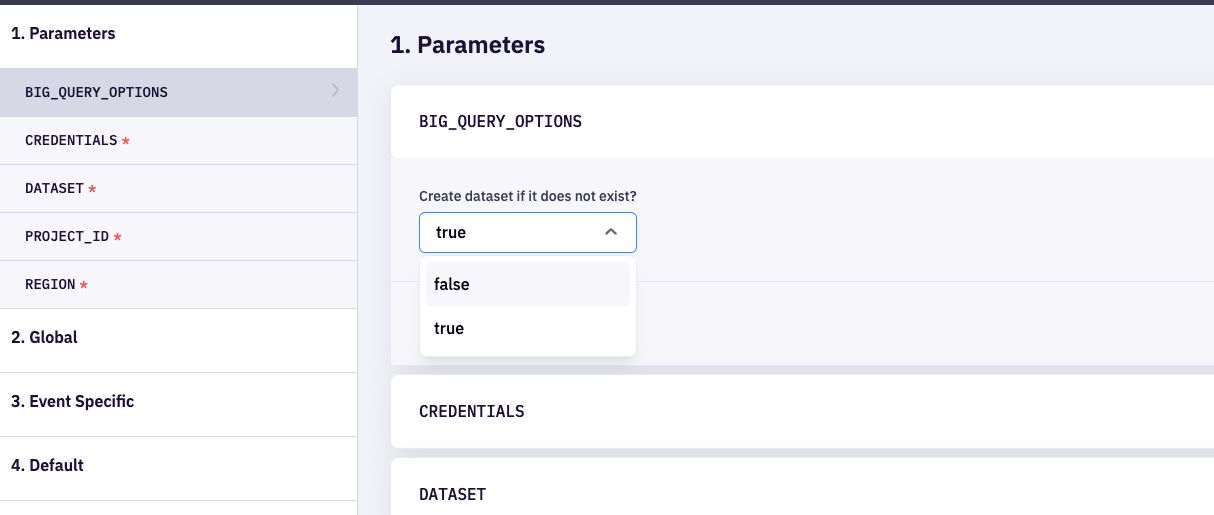
-
-
Event Table Schema Consistency:
- Once an event table is created in BigQuery, its schema must remain consistent. MetaRouter does not programmatically delete or alter the structure of existing event tables to prevent data inconsistencies and ensure data integrity. This means any changes to the event structure should be carefully planned and manually handled.
- MetaRouter cannot alter or delete existing columns, but we can add new columns based on new parameters being included in an event payload and mapped to the destination. This allows for extending the data model as new requirements emerge, without disrupting the existing data flow. However, ensure that new columns follow the established schema and data type conventions to maintain consistency.
-
Data Type Consistency:
- It is crucial to maintain data type consistency for each field across all events. For instance, if a field is initially set as a string, all subsequent events must adhere to this data type. Inconsistent data types can cause ingestion errors and complicate data analysis. Establishing and following a strict schema ensures smooth data processing and accurate analysis.
- If MetaRouter infers the wrong type for a field, for example a formatted date string that should be stored as a
TIMESTAMP, useFIELD_OVERRIDESto set the column type explicitly.
-
Table Overrides Behavior:
- Events with a custom table name defined in
TABLE_OVERRIDESwill be routed to their specified tables. - If
DEFAULT_TABLE_OVERRIDEis not provided, any event not listed inTABLE_OVERRIDESwill be stored in a table named after the event. - If
DEFAULT_TABLE_OVERRIDEis provided, events not defined inTABLE_OVERRIDESwill be sent to the specified default table. - Both
TABLE_OVERRIDESandDEFAULT_TABLE_OVERRIDEfields are optional. If neither is provided, each event will be stored in a BigQuery table named after the event (default behavior). - Example:
- Events with a custom table name defined in
DEFAULT_TABLE_OVERRIDE: "catch_all_events"
TABLE_OVERRIDES:
  identify: identities
  page: page_view
products_searched: search- Partitioning:
- The optional
PARTITIONINGparameter lets you store some or all events in BigQuery tables that are split into time-based partitions (by hour, day, month, or year). Partitioned tables are cheaper and faster to query when you filter by date, so this is most useful for your highest-volume events. - Partitioning is set when MetaRouter first creates a table. BigQuery does not allow partitioning to be added, removed, or changed on a table that already exists. For that reason, partitioned tables get a new name by default, such as
page_daily, rather than reusing the existingpagetable. TABLE_OVERRIDEStakes priority: an event listed there always goes to that plain table and is never partitioned.DEFAULT_TABLE_OVERRIDEis only a fallback for events with no other rule.- See the Partitioning section below for the full configuration.
- The optional
Getting Started - From Your Google BigQuery Account
Step 1: Gather Project ID
- Navigate to the Google Cloud Console:
- Go to the Google Cloud Console.
- Select Your Project:
- Click on the project drop-down menu at the top of the page. If you have multiple projects, you can select the appropriate one from this list. If you don’t have a project, you can create a new one by clicking on "New Project".
- Locate the Project ID:
- Once you have selected your project, the Project ID will be displayed on the project dashboard. It is typically in the format of
my-project-id.
- Once you have selected your project, the Project ID will be displayed on the project dashboard. It is typically in the format of
Step 2: Choose Your Authentication Method
Path A - Workload Identity Flow
- Set up a service account and gather credentials:
- If you are using the Workload Identity flow, please reach out to your MetaRouter representative. We will generate a service account email for you.
- Grant Permissions:
- Assign the necessary roles to the service account email provided by the MetaRouter team. You will need to grant at least the "BigQuery Data Editor" roles. Please see more information on user roles below:
- BigQuery IAM Roles and Permissions - If you select
BIG_QUERY_OPTIONSasfalsein the connection parameters, then you do not have to give permission to create a dataset. - Control access to resources with IAM
- BigQuery IAM Roles and Permissions - If you select
- Authentication with Workload Identity
- Leave the
CREDENTIALSfield empty in your MetaRouter BigQuery integration configuration. When no credentials are provided, the integration automatically falls back to GCP default credentials, which Workload Identity supplies.
- Leave the
- Assign the necessary roles to the service account email provided by the MetaRouter team. You will need to grant at least the "BigQuery Data Editor" roles. Please see more information on user roles below:
Path B - Service Account Key Flow
- Create a Service Account:
- Navigate to the Google Cloud Console.
- Go to "IAM & Admin" section and select "Service Accounts".
- Click "Create Service Account", enter a name, and provide a description.
- Please be sure to associate this account with the project associated with the project ID you will use for this integration.
- Grant Permissions:
- Assign the necessary roles to your service account. You will need to grant at least the "BigQuery Data Editor" roles. Please see more information on user roles below:
- BigQuery IAM Roles and Permissions - If you select
BIG_QUERY_OPTIONSasfalsein the connection parameters, then you do not have to give permission to create a dataset. - Control access to resources with IAM
- BigQuery IAM Roles and Permissions - If you select
- Assign the necessary roles to your service account. You will need to grant at least the "BigQuery Data Editor" roles. Please see more information on user roles below:
- Create and Download Key File:
- After creating the service account, go to the "Keys" section and add a key.
- Select "Create new key", choose "JSON", and download the key file. This JSON file contains the credentials needed to authenticate your application with BigQuery.
- Use the Key File as
CREDENTIALS:- Upload the key file to your MetaRouter integration configuration as part of the setup process for BigQuery.
Step 3: Decide How Events Map to Tables
Decide how you want events stored before MetaRouter delivers the first one. MetaRouter never alters or deletes a table once it exists, and BigQuery does not allow partitioning to be changed on an existing table, so these choices are easiest to make up front.
- One table per event (default): each event, such as
pageororder_completed, gets its own plain table named after the event. No configuration is needed. - Custom table names: use
TABLE_OVERRIDESto send specific events to tables you name, andDEFAULT_TABLE_OVERRIDEto collect every other event into a single table. See Important Notes above. - Partitioned tables: use
PARTITIONINGto store high-volume events in time-partitioned tables, which lowers query cost and speeds up queries that filter by date. See Partitioning below.
You can change these settings later, but tables that already exist keep their current structure. New settings only affect tables MetaRouter creates after the change.
Getting Started - From Your MetaRouter Account
Adding a Google BigQuery integration
From the integration library, add a Google BigQuery integration. Then, fill out the Connection Parameters:
| Connection Parameter | Description |
|---|---|
BIG_QUERY_OPTIONS | Select true if you would like the integration to create the dataset if it does not exist. If you select false, the integration will not create the dataset and you do not have to grant the bigquery.datasets.create permission in the IAM role. If the dataset does not exist, no events will be delivered. |
CREDENTIALS | JSON key from file downloaded from Google Cloud Console. |
DATASET | Name of dataset. If the dataset does not exist, the integration will create it with the given name (unless BIG_QUERY_OPTIONS is false). Please follow dataset naming best practices as outlined https://cloud.google.com/bigquery/docs/datasets#dataset-naming. |
PROJECT_ID | Project ID gathered from Google Cloud Console. |
REGION | Location specified for your BigQuery dataset. ENUM accepting string values, please see https://cloud.google.com/bigquery/docs/locations#regions. |
DEFAULT_TABLE_OVERRIDE | Specifies a default table name for events not explicitly mapped. Optional, please see Important Notes section. |
TABLE_OVERRIDES | A key-value object where the key represents an event name, and the value specifies the corresponding BigQuery table name. Optional, please see Important Notes section. |
FIELD_OVERRIDES | YAML list that sets the BigQuery column type for specific fields instead of letting MetaRouter infer it. Each entry has table, field, and fieldType (BIG_QUERY_FIELD_TYPE_STRING or BIG_QUERY_FIELD_TYPE_TIMESTAMP). Optional. Useful when a formatted string should be stored as a TIMESTAMP. |
PARTITIONING | Stores selected events in time-partitioned tables to lower query cost on high-volume data. Optional, please see the Partitioning section. |
Partitioning
BigQuery can split a table into partitions by time, so a query that filters by date only scans the days (or hours, months, or years) it needs. This lowers query cost and speeds up queries on large tables. Google's partitioned tables guide explains the concept in detail.
The PARTITIONING connection parameter tells MetaRouter which events to store in partitioned tables and how to partition them. It is optional. Events you do not include are unaffected. See Which table does an event go to? below.
Settings
The value is a short YAML block. This example partitions every event by day:
granularity: BIG_QUERY_PARTITION_GRANULARITY_DAILY
partitionField: received_at
events:
- eventName: "*"| Setting | Required | What it does |
|---|---|---|
granularity | Yes | The size of each partition. One of BIG_QUERY_PARTITION_GRANULARITY_HOURLY, BIG_QUERY_PARTITION_GRANULARITY_DAILY, BIG_QUERY_PARTITION_GRANULARITY_MONTHLY, or BIG_QUERY_PARTITION_GRANULARITY_YEARLY. Daily is the most common choice. This also sets the suffix added to table names: _hourly, _daily, _monthly, or _yearly. |
partitionField | Yes | The timestamp column BigQuery uses to decide which partition each row belongs to. It must be a TIMESTAMP column that every partitioned event includes. received_at is a safe choice because the default Global mapping includes it on every event. |
expirationDays | No | Automatically delete data older than this many days. Leave it out, or set it to 0, to keep data indefinitely. |
events | Yes | The list of events to partition. Each entry has an eventName and, optionally, a tableOverride. See the next table. |
Each entry in the events list has:
| Setting | Required | What it does |
|---|---|---|
eventName | Yes | Which events this entry applies to. Use the event name as it appears as a table name in BigQuery: lowercase, with words joined by underscores (product_viewed, not Product Viewed). Wildcards are supported: * matches any characters and ? matches a single character. "*" matches every event, and product_* matches every event that starts with product_. If an event matches both an exact name and a wildcard, the exact name is used. |
tableOverride | No | The name of the partitioned table. If left out, the table is named after the event plus the granularity suffix, for example page_daily. You can include {event} in the name and it is replaced with the event name, which lets a single wildcard entry still create a separate table for each event. A tableOverride without {event} sends every matching event into one shared table. Do not reuse the name of an existing table unless it is already partitioned the same way. |
Examples
Partition every event, one table per event. Creates page_daily, identify_daily, order_completed_daily, and so on.
granularity: BIG_QUERY_PARTITION_GRANULARITY_DAILY
partitionField: received_at
events:
  - eventName: "*"
Partition only your busiest events, and delete data after 90 days. page and product_viewed go to page_daily and product_viewed_daily. Every other event follows the default behavior and is written to a plain table with a matching name, such as order_completed.
granularity: BIG_QUERY_PARTITION_GRANULARITY_DAILY
partitionField: received_at
expirationDays: 90
events:
  - eventName: page
  - eventName: product_viewed
Combine a group of events into one partitioned table. Every event that starts with product_ goes into a single table called product_events, partitioned by month. Every other event follows the default behavior and is written to a plain table with a matching name, such as page.
granularity: BIG_QUERY_PARTITION_GRANULARITY_MONTHLY
partitionField: timestamp
events:
  - eventName: product_*
    tableOverride: product_events
Choose your own table names. tableOverride can be any table name BigQuery accepts. The {event} token is replaced with each event's name and the rest is used as typed, so here page is written to page_by_hour instead of the default page_hourly. Because the pattern is "*", every event matches and gets its own table, and no event falls back to the default behavior.
granularity: BIG_QUERY_PARTITION_GRANULARITY_HOURLY
partitionField: received_at
events:
  - eventName: "*"
    tableOverride: "{event}_by_hour"
Which table does an event go to?
Every event is written to exactly one table. MetaRouter decides which one by asking three questions, in order.
1. Is there a specific rule for this event?
There are two kinds of specific rules. An event follows at most one of them.
| Kind of rule | Where you set it | What it does |
|---|---|---|
| Custom plain table | TABLE_OVERRIDES | Sends the event to a plain table with a name you choose. The table is not partitioned. |
| Partitioned table | PARTITIONING, under events | Sends the event to a partitioned table, named after the event plus a suffix unless you set tableOverride on the entry. |
If the same event appears in both places, TABLE_OVERRIDES wins and the event is not partitioned. This protects table names you set up before partitioning was available.
2. If not, is DEFAULT_TABLE_OVERRIDE set?
The event goes to that single plain table. DEFAULT_TABLE_OVERRIDE is only a fallback. It never pulls an event away from a specific rule, so setting it does not stop any event from being partitioned.
3. If not, the event goes to a plain table named after the event.
This is the default behavior, and it is what happens when none of the three settings is used. page goes to page, order_completed goes to order_completed, and so on.
Example with all three settings
Suppose the connection parameters are set as follows:
| Connection parameter | Value |
|---|---|
TABLE_OVERRIDES | identify: customers |
DEFAULT_TABLE_OVERRIDE | other_events |
PARTITIONING | Daily, on received_at, with two entries under events: eventName: page and eventName: product_* |
Here is where four different events are written:
| Incoming event | Specific rule? | Written to |
|---|---|---|
identify | Yes, listed in TABLE_OVERRIDES | customers, a plain table |
page | Yes, listed in PARTITIONING | page_daily, partitioned by day |
product_viewed | Yes, matches product_* in PARTITIONING | product_viewed_daily, partitioned |
order_completed | No | other_events, the default |
If DEFAULT_TABLE_OVERRIDE were blank, order_completed would go to a plain table called order_completed instead.
Important Notes
TABLE_OVERRIDESandtableOverrideare different settings.TABLE_OVERRIDESnames plain tables and turns partitioning off for the events listed in it.tableOverride, inside aPARTITIONINGentry, names a partitioned table. To rename a partitioned table, usetableOverride.- Partitioning cannot be changed on an existing table. To change the granularity or partition field for an event, give it a new
tableOverridename so MetaRouter creates a fresh table. - If an event arrives without the
partitionField, or the field is not a timestamp, MetaRouter still delivers it, but to the unpartitioned table for that event (for examplepageinstead ofpage_daily). If data is landing in the wrong table, check that the field is mapped in your playbook and typed as a timestamp. - Wildcard patterns and
tableOverridevalues are checked when you save the integration, so mistakes are caught before any data is sent. - Partitioning was added to the Google BigQuery integration in Q3 2026. If your integration was set up before then, the
PARTITIONINGparameter may not appear in the connection parameters yet. Reach out to your MetaRouter representative and we will enable it for you. Your existing tables and event flow are not affected.
Event Mappings
Due to the complexity of event mapping in BigQuery, it is highly recommended to reach out to the MetaRouter team and collaborate with a solutions engineer. While MetaRouter includes recommended parameters under Global mapping, you will need to accurately map events when initially building out the integration. This collaboration ensures precise and efficient configuration tailored to your specific needs.
Global
Global mappings will be applied to all events. If your parameter names do not match the Expected Inputs provided, you will need to overwrite the Inputs provided with your own.
Ensuring event and data consistency is crucial when using BigQuery with MetaRouter. Please see Notes and Limitations above.
| Output Key | Description | Expected Input |
|---|---|---|
id | String: A unique identifier for the message. This field ensures each event can be uniquely identified and tracked. | messageId |
user_id | String: A unique identifier for the user. | userId |
previous_id | String: The identifier for the previous event. | previousId |
anonymous_id | String: An anonymous identifier for the user. | anonymousId |
original_timestamp | Timestamp: The original timestamp of the event. | originalTimestamp |
received_at | Timestamp: The timestamp when the event was received. | receivedAt |
sent_at | Timestamp: The timestamp when the event was sent. | sentAt |
timestamp | Timestamp: The timestamp of the event. | timestamp |
integrations | String: Integration-specific options or overrides. | integrations |
type | String: The type of event (e.g., identify, track). | type |
event | String: The name of the event. | event |
name | String: The name associated with the event. | name |
category | String: The category associated with the event. | category |
| The context object in MetaRouter provides useful information about the environment in which an event occurred. This can include details about the page, device, browser, location, and more. | context | |
| Traits are attributes that describe a user or a group. When you call the identify method, you can pass in a traits object that includes key-value pairs of user information such as name, email, phone number, etc. | traits | |
| Properties are specific to events and provide additional context about the event itself. For instance, in a purchase event, properties might include details like the order value, product ID, quantity, and payment method. These are different from traits because they are transient and event-specific rather than being persistent attributes of a user. | properties |
Additional Google BigQuery Documentation
Updated 15 days ago